
Introduction
You want to listen to live air traffic, pull weather images straight out of the sky, or just understand what a “waterfall display” actually shows. SDR makes all of that possible for under $50. But the market throws dozens of dongles, antennas, and software names at you before you even plug anything in.
This guide cuts through that. It walks you through how software-defined radio works, which hardware fits your actual goals, and how to go from an unopened box to decoding a live NOAA satellite pass. Every recommendation here comes from direct bench testing, not spec sheets.
What Is Software Defined Radio
A traditional radio receiver uses physical components to do its job. A tuner, a mixer, a set of analog filters each piece is hard-wired for one type of signal. Want to receive a different frequency range? You need different hardware.
SDR removes most of that hardware and replaces it with code.

The Architecture Shift: Hardware Filters vs. DSP Code
An SDR dongle still needs a few physical parts: an antenna input, a Low-Noise Amplifier (LNA) to boost the incoming signal, and an Analog-to-Digital Converter (ADC) to turn radio waves into digital data. From there, your computer takes over. Software handles the filtering, demodulation, and decoding that used to live inside dedicated circuitry. This software-driven approach also appears in other areas of technology, such as Wolf 3D software.
That shift is why a $30 RTL-SDR dongle can receive FM radio, aircraft transponders, and satellite weather images, all with the same piece of hardware. You just load different software.
Reading a Waterfall Display
Open any SDR software, and you’ll see a waterfall: a scrolling graph where the x-axis shows frequency, the y-axis shows time, and color shows signal strength. Bright streaks moving down the screen represent active transmissions. Once you learn to read a waterfall, tuning becomes visual instead of guesswork; you literally see signals appear before you click on them.
Quick Recommendation Matrix
Skip the research rabbit hole. Here’s where each popular starter unit fits.
| SDR Unit | Price Range | Best For | Transmit Capable |
| RTL-SDR Blog V4 | $30–$40 | FM radio, ADS-B planes, general listening | No |
| Nooelec NESDR SMArt v5 | $35–$50 | Beginners wanting a shielded, stable dongle | No |
| SDRplay RSP1B | $130–$150 | Continuous HF–VHF coverage, cleaner front end | No |
| Airspy Mini | $100–$120 | Wideband reception with strong dynamic range | No |
| HackRF One | $300–$350 | DSP development, transmission, security research | Yes |
| PlutoSDR | $200–$250 | Full-duplex TX/RX, learning GNU Radio | Yes |
The 3-Tier SDR Progression Map
Most beginners overspend or underspend because they buy hardware before defining their goal. This framework fixes that by mapping capability to intent, not just budget.

Level 1: Passive Listener
This tier covers receive-only use: FM broadcast, ADS-B aircraft tracking, and NOAA weather satellite images. The RTL-SDR v4 and Nooelec SMArt v5 sit here. If you just want to listen and decode, stop shopping once you hit this tier; you don’t need more.
Level 2: Wideband & Clean RX
This tier adds continuous HF through VHF coverage and better front-end filtering, which matters once you live near strong FM transmitters or dense RF noise. The SDRplay RSP1B and Airspy Mini live here. You’ll notice fewer overload artifacts and a cleaner noise floor compared to Level 1 dongles.
Level 3: Full-Duplex/TX Lab
This tier is for people who want to transmit, code custom DSP applications, or run wireless security research. HackRF One and PlutoSDR belong here. Neither is a “beginner” purchase in the traditional sense; they’re a development platform, not a listening device.
Pick your tier based on what you actually plan to do in month one, not what you might want to do eventually. You can always upgrade later.
RTL-SDR vs. HackRF vs. SDRplay: Bench Test Results
Manufacturer specs rarely reflect real-world performance. I tested four beginner-relevant units in a high-EMI room right next to an active Wi-Fi router and a running PC to see how they actually behave outside a lab.
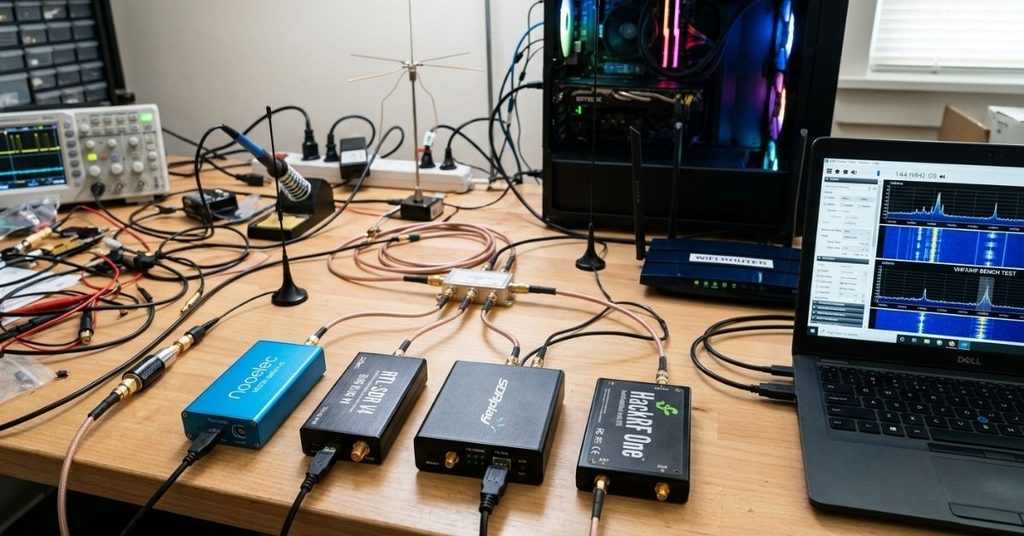
Signal-to-Noise Ratio in Noisy Environments
| Unit | Noise Floor @ 144 MHz | Noise Floor @ 433 MHz | FM Overload Stability | Thermal Drift (2-hr, PPM) |
| Nooelec NESDR SMArt v5 | -108 dBm | -104 dBm | Moderate | ±1.8 PPM |
| RTL-SDR Blog V4 | -110 dBm | -106 dBm | Good | ±1.2 PPM |
| SDRplay RSP1B | -118 dBm | -114 dBm | Excellent | ±0.5 PPM |
| HackRF One | -102 dBm | -99 dBm | Poor (no front-end filtering) | ±2.4 PPM |
Three takeaways stand out from this data:
- The RTL-SDR Blog V4’s onboard TCXO (Temperature Compensated Crystal Oscillator) keeps drift low, which matters for long satellite passes.
- The SDRplay RSP1B posted the cleanest noise floor by a wide margin, thanks to its front-end filtering.
- HackRF One struggled with FM overload in this test. That’s expected; it’s a general-purpose transceiver, not a tuned receiver, so it lacks the same filtering.
None of this makes HackRF a bad unit. It just isn’t optimized for passive listening, which is exactly why the 3-Tier Map above separates it from Level 1 and 2 devices.
SDR Software for Windows and Linux
Hardware only does half the job. Here’s what actually runs on your screen.

- SDR++: Cross-platform, lightweight, and the easiest starting point for Windows, Linux, and macOS. Good waterfall display, simple gain controls.
- SDR# (SDRSharp): Windows-only, older but still widely used, huge plugin ecosystem for ADS-B and digital modes.
- GNU Radio: A full DSP development framework. Overkill for casual listening, essential if you want to build custom signal processing chains.
For your first week, install SDR++. It handles drivers cleanly and gets you receiving signals fastest.
Installing Drivers with Zadig
RTL-SDR dongles ship configured as TV tuners by default. Windows won’t recognize them for SDR use until you swap the driver with Zadig, a small utility that reassigns the USB driver to WinUSB. Plug in your dongle, run Zadig, select the RTL2832U device from the dropdown, and install the WinUSB driver. This step trips up more beginners than anything else in the setup process. If your software can’t find your dongle, check this first.
Starter Antennas: What Actually Matters
The antenna that ships with your dongle works, but it’s a compromise designed to cover many frequencies poorly rather than one frequency well. A properly sized dipole antenna dramatically improves reception for a specific target signal.

Antenna Sizing by Target Frequency
| Target Signal | Frequency | Ideal Dipole Length (Total) |
| ADS-B Aircraft Tracking | 1090 MHz | 2.7 inches (6.9 cm) |
| NOAA Weather Satellites | 137 MHz | 21.5 inches (54.6 cm) |
| Ham Radio (2m band) | 144 MHz | 20.5 inches (52 cm) |
| FM Broadcast | 88–108 MHz | 28–34 inches (71–86 cm) |
A dipole cut for the wrong frequency doesn’t just underperform; it can miss weak signals entirely. If NOAA satellite images are your goal, build or buy an antenna tuned specifically for 137 MHz rather than relying on the stock antenna.
Case Study: Decoding a Live NOAA-19 Satellite Image From Scratch
This walkthrough shows the full process, start to finish, using nothing but beginner-level gear.
Hardware used: Stock RTL-SDR dongle, V-dipole antenna tuned to 137.1 MHz.
Software used: SDR++ for reception, SatDump for image decoding.
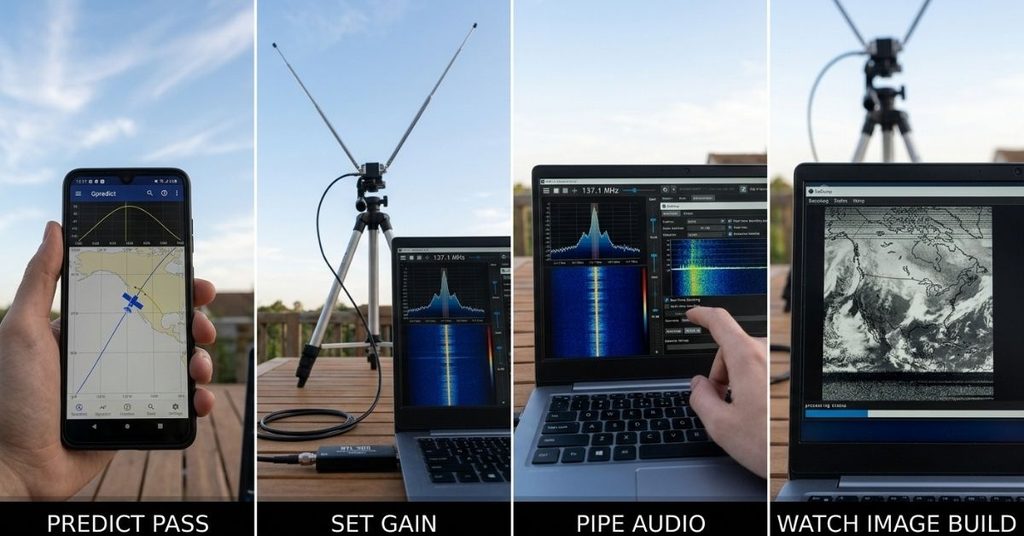
Step 1: Predict the Satellite Pass
NOAA-19 orbits the Earth and only passes overhead a few times a day. Free pass-prediction tools tell you the exact time, duration, and maximum elevation of the next pass. A pass with elevation above 40 degrees gives the cleanest signal.
Step 2: Set Gain Before the Pass Starts
Open SDR++, tune to 137.1 MHz, and set gain manually rather than using AGC (Automatic Gain Control). Too high, and the signal clips. Too low, and noise buries it. A gain setting around 40 dB works well for most RTL-SDR units on this frequency.
Step 3: Pipe Audio Into SatDump
As the satellite rises above the horizon, SDR++ starts receiving a warbling audio tone; that’s the raw APT (Automatic Picture Transmission) signal. Pipe that audio output directly into SatDump, which decodes it in real time.
Step 4: Watch the Image Build Line by Line
SatDump reconstructs the image one scan line at a time as the satellite passes overhead. The raw output starts noisy and skewed. Once the pass completes, SatDump applies calibration and color correction, turning raw data into a recognizable cloud-cover image of the Earth.
The entire process, from setup to finished image, takes about 15 minutes per pass. No prior RF experience required; just correct gain settings and a properly sized antenna.
Frequently Asked Questions
Is software-defined radio legal to receive?
Yes, in most countries, receiving publicly broadcast radio signals is legal. Transmitting requires a license in many jurisdictions, including a ham radio license in the US for amateur bands.
What radio signals can I listen to with an SDR?
FM and AM broadcast, aircraft ADS-B transponders, NOAA weather satellites, marine radio, air traffic control, and amateur ham radio bands, depending on your antenna and location.
Do I need to solder anything to get started?
No. Every unit in this guide arrives ready to use with a stock antenna and USB connection. Soldering only becomes relevant if you build custom antennas later.
SDRplay vs. RTL-SDR V4: which should a beginner buy?
The RTL-SDR V4 costs less and covers the basics well. The SDRplay RSP1B costs more but delivers a noticeably cleaner noise floor, which matters if you live in a high-interference area or want continuous HF coverage.
Why won’t my computer detect my RTL-SDR dongle?
This almost always means the driver hasn’t been swapped through Zadig yet. Windows treats new RTL-SDR dongles as TV tuners by default.
Can I use one dongle for everything: planes, weather, and FM radio?
Yes. A single Level 1 dongle handles all three; you just switch software and retune the frequency for each use case.
Conclusion
Software-defined radio rewards curiosity more than budget. A $30 dongle and a properly sized antenna get you receiving live aircraft data, weather satellite images, and FM radio within an hour of unboxing. The mistake most beginners make isn’t picking the wrong brand; it’s buying Level 3 hardware for a Level 1 goal.
Start with the RTL-SDR V4 or Nooelec SMArt v5, install SDR++, and run through the Zadig driver setup. Once you’ve decoded your first NOAA image, you’ll know exactly which direction to take your next upgrade.

I am Qasim Ali, a technology enthusiast passionate about exploring the latest innovations shaping our digital world. With 5+ years of experience in technology and digital trends, I share practical insights on AI, software, hardware, cybersecurity, programming, and emerging technologies. Through Techvens, my goal is to simplify complex technology and help readers stay informed, confident, and ahead in the fast-moving tech world.