
Introduction
Most students open a Python assignment and stare at a red error message for twenty minutes before they even understand what went wrong. That moment doesn’t have to repeat every week. A structured approach can make Python Programming Homework Help more practical by showing students how to solve problems instead of simply giving them answers.
This guide breaks down how to read Python errors, choose the right data structures, write clean object-oriented code, and test your work before you submit it. It follows the habits of professional software engineers, scaled down for coursework.
Why Python Homework Feels Harder Than It Should
Computer science education has shifted. Courses used to reward students who could read syntax and recognize patterns. Now they reward students who can decompose a problem into smaller pieces and reason through each one.
That shift catches a lot of students off guard. They memorize for loops and if statements, then freeze when a professor asks them to build a class hierarchy or debug a stack trace they’ve never seen before.
The fix isn’t more memorization. It’s a mindset shift: treat every assignment like a small engineering problem, not a syntax quiz. Break it into environment setup, design, implementation, and testing. Professional developers work this way, and it scales down well to a 200-line homework script.
Set Up Your Environment and Diagnostic Tools
Half of all beginner frustration comes from a broken or inconsistent setup, not from Python itself. Fix your environment first.

Choosing an IDE: VS Code, PyCharm, or IDLE
| Tool | Best For | Learning Curve | Debugging Support |
| VS Code | Most students; lightweight, extensible | Low | Strong (breakpoints, watch variables) |
| PyCharm | Larger OOP projects, multi-file assignments | Medium | Very strong (built-in refactoring tools) |
| IDLE | Quick scripts, first-week exercises | Very low | Minimal |
VS Code works for the majority of coursework because it stays fast and handles both small scripts and larger multi-file projects. PyCharm earns its place once your assignments involve several classes and modules, since its refactoring tools save real time. IDLE suits only the earliest exercises, where you just need to test a few lines.
Configuring Virtual Environments and Linters
Create a virtual environment for every assignment folder instead of installing packages globally. Run python -m venv venv, then activate it before installing anything. This keeps package versions isolated per project, so one assignment’s dependencies never break another’s.
Add a linter early. flake8 flags unused imports, undefined names, and style violations before you run the code. black reformats your file automatically to match PEP 8, so you stop losing points on spacing and line length. Both tools take under five minutes to configure and catch mistakes a human grader would otherwise mark down.
Fundamental Python Assignment Patterns
Most Python homework, regardless of course level, tests the same handful of skills repeatedly. Before working through these patterns, it helps to understand what coding is and how programmers turn instructions into executable tasks. Master these four areas and the rest becomes a variation on a theme.
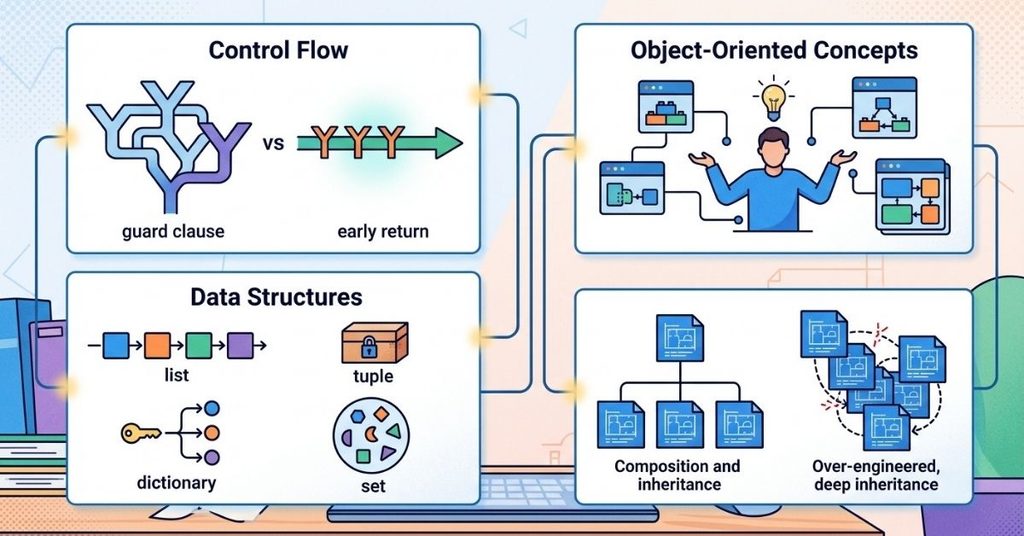
Control Flow: Replace Nested Ifs with Guard Clauses
Deeply nested if statements make code hard to read and hard to grade. A guard clause exits early and flattens the logic.
Instead of nesting a validation check three levels deep, return immediately when a condition fails. This single habit often turns a 15-line function into six lines, and graders notice the difference in readability scores.
Data Structures: Match the Tool to the Lookup Pattern
Picking the wrong data structure costs more points than any syntax error. Base your choice on how you’ll access the data, not on habit.
- List: use it when order matters, and you need to iterate sequentially or allow duplicates.
- Tuple: use it for fixed, unchanging groups of values, since immutability prevents accidental edits.
- Dictionary: use it when you need fast key-based lookups; average lookup time stays near constant, $\mathcal{O}(1)$, versus $\mathcal{O}(n)$ for a list scan.
- Set: use it when you need uniqueness or fast membership testing, and order doesn’t matter.
A common assignment mistake involves using a list to check membership repeatedly (if x in my_list) when a set would perform the same check far faster on large inputs.
Object-Oriented Concepts: Writing Clean Classes
Three habits separate clean OOP assignments from messy ones:
- Keep each class responsible for one clear concept; a Student class shouldn’t also manage file I/O.
- Use instance attributes (self.name) for data that varies per object, and reserve class attributes for values genuinely shared across every instance.
- Favor composition over deep inheritance chains; a three-level inheritance tree usually signals over-engineering for homework-scale problems.
A frequent class-variable pitfall: defining a mutable default like a list directly as a class attribute. Every instance then shares the same list, and changes in one object silently affect all others. Initialize mutable attributes inside __init__ instead.
The Five-Step Python Debugging Matrix
This framework structures how to isolate a bug before you ask anyone for help. Work through the steps in order; skipping ahead usually wastes more time than it saves.
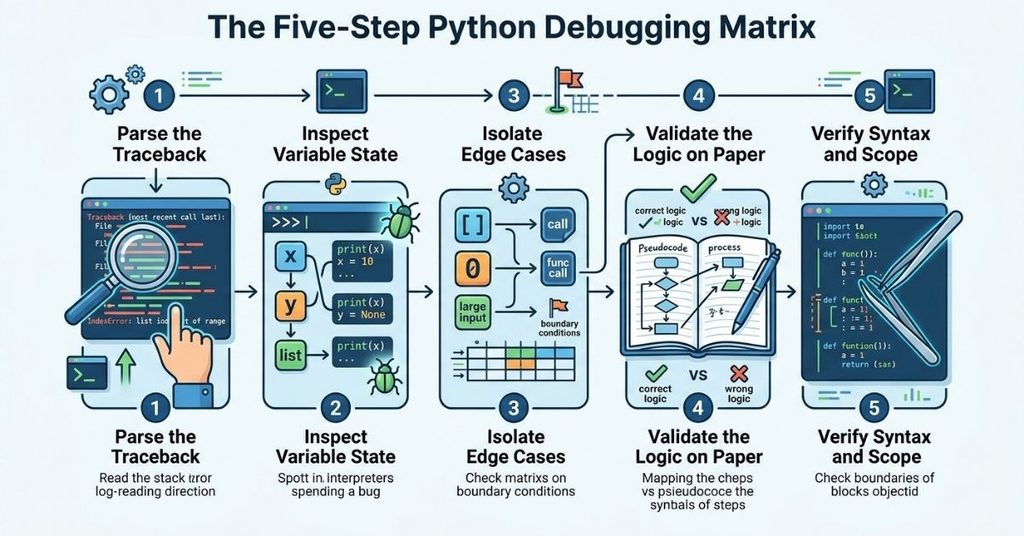
Step 1: Parse the Traceback
Read the traceback from the bottom up. The last line names the exception type and the message. The line just above it shows the exact line number where Python detected the failure. Start there, not at the top of your file.
Step 2: Inspect Variable State
Insert print() statements around the failing line, or set a breakpoint in your IDE. Confirm what each variable actually holds at that moment, not what you assumed it holds.
Step 3: Isolate Edge Cases
Test your function against an empty list, a zero value, and an unusually large input. Many assignment bugs only appear at these boundaries, not during normal execution.
Step 4: Validate the Logic on Paper
Map your code’s execution to pseudocode by hand. This step catches logic errors that no debugger will flag, because the code runs without crashing; it just produces the wrong answer.
Step 5: Verify Syntax and Scope
Audit indentation, missing colons, and variable scope last. These issues throw immediate errors, so they’re usually the easiest to catch once you know exactly where to look.
Common Errors and How to Fix Them
| Error Type | Typical Cause | Quick Fix |
| IndentationError | Mixed tabs and spaces | Set your editor to insert spaces only |
| SyntaxError | Missing colon, unmatched parenthesis | Read the line above the reported line number too |
| IndexError | Loop range exceeds list bounds | Check range(len(my_list)) boundaries |
| KeyError | Accessing a missing dictionary key | Use .get(key, default) instead of dict[key] |
| TypeError | Mixing incompatible types (e.g., str + int) | Cast explicitly with str() or int() |
Case Study: Refactoring a Slow Recursive Function
A naive recursive Fibonacci function is a common homework assignment, and it’s also a common source of frustration. Written the obvious way, it recalculates the same values over and over, giving it $\mathcal{O}(2^n)$ time complexity. For any input at or above roughly $N = 35$, the program appears to freeze.
The fix uses memoization. Adding Python’s built-in @functools.lru_cache decorator above the function stores previously computed results, so the function never recalculates the same value twice. That single decorator drops the complexity to $\mathcal{O}(n)$.
The practical difference is significant: the naive version can take tens of seconds or longer once $N$ passes 35, while the cached version returns the same result in a fraction of a millisecond. This example shows why understanding time complexity matters even for a short homework script: the algorithm’s shape determines whether your program finishes in an instant or times out during grading.
Analyzing Real Assignment Mistakes
Reviewing patterns across a large batch of introductory assignments reveals where students consistently lose points. Four categories account for most of the errors:
- Scope misunderstanding: mutating a global variable from inside a function without declaring it makes up the largest share of mistakes.
- Off-by-one errors in range() loops form the second-largest category, usually from confusing inclusive and exclusive bounds.
- Mutating a list while iterating over it causes skipped or duplicated elements and trips up a meaningful portion of submissions.
- Unhandled exceptions, particularly KeyError and TypeError, account for the remainder.
Knowing which mistakes are most common lets you audit your own code against the likeliest failure points first, rather than reading every line with equal suspicion.
Testing Your Code Before You Submit
Professional developers don’t trust code until they’ve tested it. Apply the same standard to homework.

Write Basic Assertions First
Before building a full test suite, add a few assert statements directly under your function to confirm expected outputs against known inputs. This catches obvious mistakes in seconds.
Use unittest or pytest for Larger Assignments
For multi-function or multi-class assignments, a small pytest file pays off. Write one test per requirement listed in the assignment prompt. If your professor lists five requirements, write five tests. This turns “I think it works” into “I confirmed it works,” and it often mirrors how the assignment gets graded.
Document Your Code
Add a docstring to every function and class that explains what it does, what it accepts, and what it returns. Function annotations (def add(a: int, b: int) -> int:) make your intent explicit and help graders and future you understand the code without tracing through every line.
Academic Integrity and Using AI Tools Responsibly
Documentation and AI tools both help you learn, but only if you use them to understand concepts rather than to skip understanding entirely.
Start with official documentation at docs.python.org before searching elsewhere; it’s accurate and directly tied to the version you’re running.
When you use an AI tool to explain a concept or debug an error, ask it to explain the reasoning, not just produce the fixed code.
Then rewrite the solution yourself. Submitting AI-generated code as your own work typically violates academic integrity policies, and it also skips the actual learning the assignment is meant to test.
Frequently Asked Questions
Why does my Python code run in IDLE but throw errors in VS Code?
Different environments sometimes point to different Python installations or virtual environments. Check which interpreter your IDE has selected and confirm it matches the one where your packages are installed.
What’s the fastest way to find a bug in a 100-line script?
Start with the traceback’s last line, then apply the Five-Step Debugging Matrix above. Isolate the failing function and test it alone with simple inputs before checking the rest of the script.
Should I use a list or a dictionary for my assignment?
Use a dictionary when you need to look up values by a key. Use a list when order matters and you’re iterating through items sequentially. If you find yourself scanning a list repeatedly to check membership, switch to a set or dictionary instead.
How do I know if my code is “Pythonic” enough for full style points?
Run flake8 and black against your file before submitting. Most PEP 8 violations spacing, naming, line length et flagged automatically, so you can fix them in minutes rather than losing points on style.
Is recursion always slower than a loop?
Not always, but naive recursion without memoization often repeats the same calculations, as shown in the Fibonacci case study above. Add caching, or convert to an iterative approach, when a recursive function handles large inputs.
Can I use AI tools to help with my Python homework?
Yes, for learning and debugging explanations, as long as your institution’s academic integrity policy allows it and you write the final submitted code yourself. Use AI the way you’d use a tutor, not the way you’d use a ghostwriter.
Conclusion
Python homework gets easier once you stop treating it as a syntax test and start treating it as a small engineering problem. Python Programming Homework Help can guide you through difficult concepts, but you should use that support to strengthen your own problem-solving skills.
Set up your environment properly, choose data structures based on how you’ll access them, write classes with a single clear responsibility, and work through bugs with a repeatable process instead of guesswork.
Test your code before you submit it, and use documentation and AI tools to build understanding rather than to bypass it. These habits don’t just raise your grade; they’re the same habits that carry over into real software engineering work after graduation.

I am Qasim Ali, a technology enthusiast passionate about exploring the latest innovations shaping our digital world. With 5+ years of experience in technology and digital trends, I share practical insights on AI, software, hardware, cybersecurity, programming, and emerging technologies. Through Techvens, my goal is to simplify complex technology and help readers stay informed, confident, and ahead in the fast-moving tech world.