
Introduction
Coding runs the apps on your phone, the checkout page on your favorite store, and the maps app that gets you home. Yet most people never learn what actually happens when a programmer “writes code.”
This guide breaks it down from the ground up. You’ll learn what coding means, how computers actually run your instructions, which languages to learn first, and how to write your first line of code today.
What Is Coding? A Simple Definition
Coding means writing instructions that a computer can follow. You write these instructions in a programming language, a set of rules with its own vocabulary and grammar. The computer reads your instructions and performs a task: it calculates a number, displays a webpage, or sends a message.
Think of coding as writing a very literal recipe. A human cook fills in gaps using judgment. A computer doesn’t. It follows every instruction exactly, in exact order, with zero assumptions. That precision is what makes coding both powerful and unforgiving.
Coding Definition vs Everyday Language
Human language allows ambiguity. “Turn up the heat a bit” makes sense to a person. A computer needs an exact value: set_temperature(72). Code strips out guesswork. Every command has one meaning, and the computer executes it the same way every time.
Coding vs Programming: What’s the Difference?
People use “coding” and “programming” interchangeably, but they aren’t identical.
- Coding refers to the act of translating instructions into a language a computer understands. It’s the typing, the syntax, the raw act of writing statements.
- Programming covers the whole process: planning a solution, designing the logic, writing the code, testing it, and fixing what breaks.
Coding is one step inside programming. A programmer plans an app’s structure, decides how data moves through it, and only then starts coding the actual lines. You can code without deeply understanding programming, but strong programmers always understand both.
How Does Coding Work?
This is the part most beginner guides skip. Running a program actually results in the following.
Programming languages sit between human and machine languages. Writing in a language you understand is important. The computer only understands binary: sequences of 0s and 1s that represent electrical signals. Something has to bridge that gap, and that’s where compilers and interpreters come in.
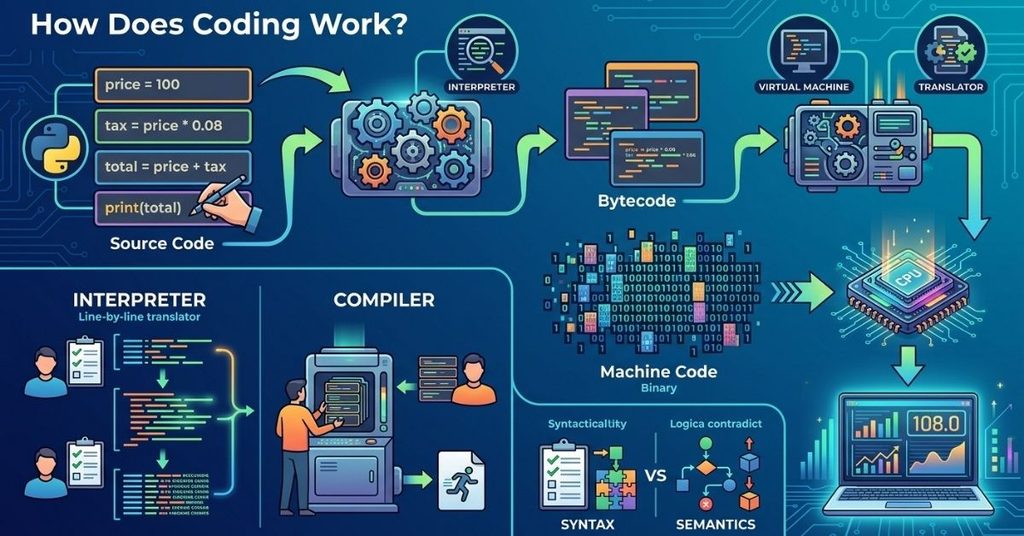
A Line-by-Line Breakdown: Watching Code Turn Into Execution
Take this simple three-line Python program that calculates a total price with tax:
price = 100
tax = price * 0.08
total = price + tax
print(total)
Here’s the journey this code takes before you see a result on screen:
- Source code: You write the four lines above in plain, readable Python.
- Interpreter reads it: Python doesn’t compile ahead of time like some languages. Its interpreter reads each line, checks the syntax, and converts it step by step.
- Bytecode: The interpreter turns your source code into bytecode, a lower-level, platform-independent format the Python Virtual Machine can process quickly.
- Machine code: The Python Virtual Machine converts that bytecode into machine code, instructions built entirely from binary digits like 01010011.
- CPU execution: Your computer’s processor executes those binary instructions directly, performing the multiplication and addition in nanoseconds.
- Output: The result travels back up through each layer and prints 108.0 to your screen.
You typed four lines. Your CPU never saw Python at all. It only ever saw binary.
Source Code vs Binary Code
Source code is what you write: readable text following a language’s rules. CPUs run binary code: 0s and 1s. No human reads binary comfortably, and no CPU reads Python directly. Every programming language exists to let humans work in source code while machines still get their binary.
Compilers and Interpreters
Both tools convert source code into something a machine can run, but they work differently.
- Before execution, a compiler converts your program into machine code. Compilers are used in languages such as C++ and Rust. You get a fast, standalone executable file, but you must recompile after every change.
- Interpreters translate and execute code line by line. Python and JavaScript use interpreters (or a hybrid approach). This makes testing faster, since you don’t wait for a full compile, but execution tends to run slower than compiled code.
Some modern languages, including Java and Python, blend both approaches using just-in-time compilation to balance speed and flexibility.
Syntax and Semantics
Syntax is the grammar of a language: where semicolons go, how you open and close brackets, how you name a variable. Break syntax rules and your code won’t even run.
Semantics is the meaning behind your code. Code can follow perfect syntax and still do the wrong thing. total = price – tax runs without error, but it calculates the wrong total if you meant to add tax. Syntax errors stop your program. Semantic errors let it run, quietly, incorrectly.
Popular Programming Languages for Beginners
Every language solves particular problems well. Picking one depends on what you want to build.
| Language | Best For | Learning Curve | Runs On |
| Python | Data science, automation, beginners, AI | Gentle | Interpreted |
| JavaScript | Websites, interactive front-ends | Moderate | Interpreted (browser/Node.js) |
| Java | Enterprise apps, Android apps | Steeper | Compiled + JVM |
| C++ | Games, systems software, performance-heavy apps | Steep | Compiled |
| SQL | Databases, data queries | Gentle | Interpreted by database engines |
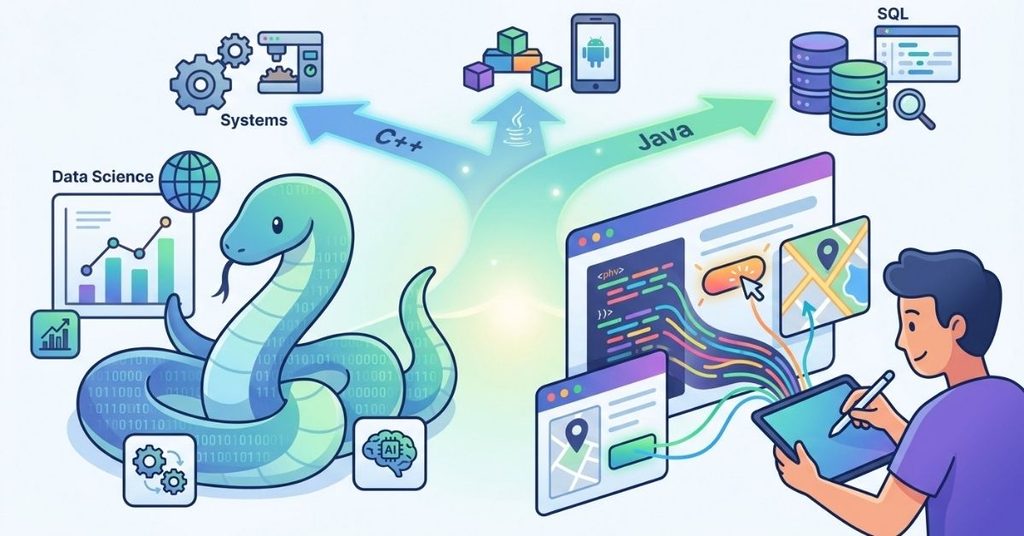
Python for Beginners
Python reads close to plain English. print(“Hello, World!”) genuinely prints “Hello, World!” with no extra setup ceremony. Its clean syntax removes a lot of early frustration, which is why it dominates beginner courses, data science, and automation scripts.
JavaScript Basics
JavaScript runs in every web browser, making it the language behind interactive buttons, dynamic forms, and live content updates. Where Python often lives on a server or your local machine, JavaScript can run directly in the browser tab your visitor already has open. Learn JavaScript, and you can build features users click, drag, and interact with in real time.
Front-End vs Back-End Development
A website has two halves working together.
Front-end development builds everything a visitor sees and touches: layout, colors, buttons, forms. Front-end developers work mainly with HTML, CSS, and JavaScript.
Back-end development builds what happens behind the scenes: databases, servers, business logic, security. A back-end developer might use Python, Java, PHP, or Node.js to process a form submission, check a password, or fetch a user’s order history.
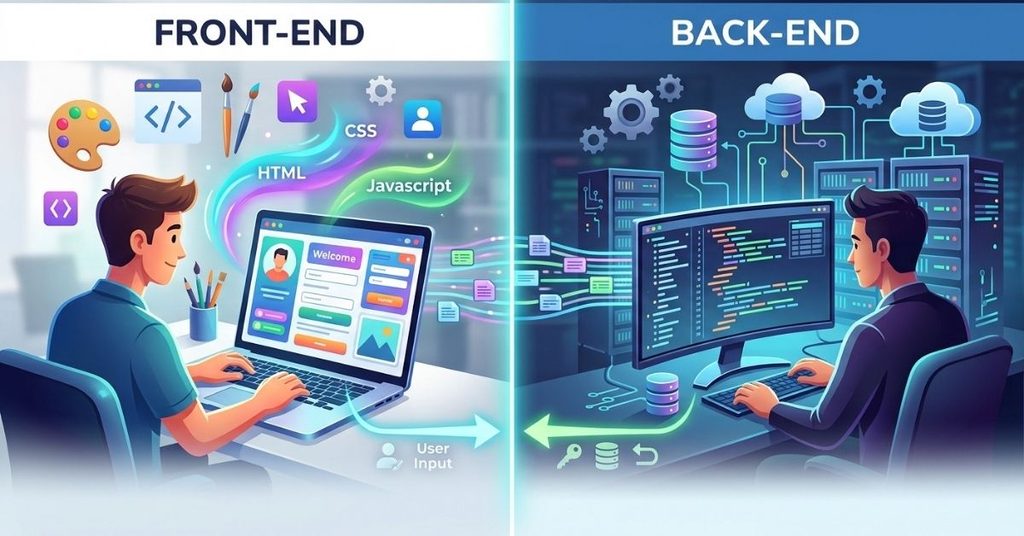
When you submit a login form, the front-end captures what you type and sends it off. The back-end checks your credentials against a database and sends back a response. Neither half works alone. A complete web application needs both.
The Software Development Lifecycle
Professional software doesn’t get written in one sitting. It follows a repeatable process called the software development lifecycle (SDLC). Developers use this structured approach to build many types of applications, including specialized solutions such as HSE software, from planning and design to testing, deployment, and maintenance.
- Planning: Define the problem and the goal.
- Design: Map out the structure, data flow, and architecture.
- Development: Write the actual code.
- Testing: Check for bugs, edge cases, and broken logic.
- Deployment: Release the software to real users.
- Maintenance: Fix bugs, add features, and keep the software running as needs change.
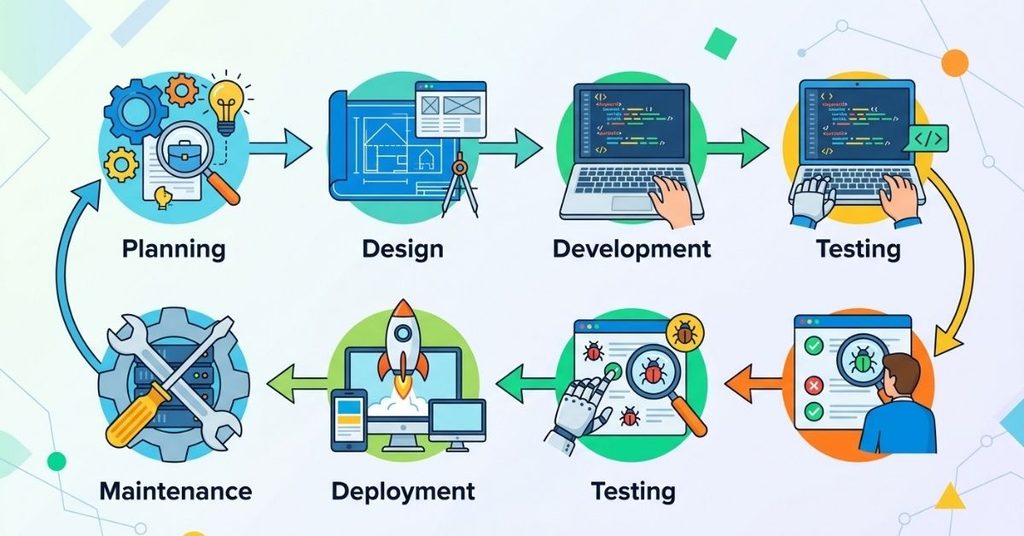
Beginners often jump straight to step three. Experienced developers know that skipping planning and testing costs far more time later than it saves early on.
Logic and Algorithms: The Building Blocks of Every Program
An algorithm is a step-by-step method for solving a problem, independent of any specific language. Before you write a single line of code, you plan the logic: what happens first, what happens if a condition is true, what happens if it isn’t.
Consider sorting a list of numbers from smallest to largest. The algorithm (the plan) stays the same whether you write it in Python, Java, or C++. Only the syntax changes. Strong programmers separate these two skills deliberately: they solve the logic problem first, on paper or in plain language, then translate that solution into code.
Text Editor vs IDE: What You Need to Start Coding
You need software to write code, and you have two main options.
A text editor is lightweight and fast. Tools like VS Code or Sublime Text let you write and edit code with helpful extras like syntax highlighting, but they don’t include built-in tools for running or debugging complex projects unless you add extensions.
An IDE (Integrated Development Environment) bundles everything together: a code editor, a debugger, build tools, and often a built-in terminal. Tools like PyCharm or IntelliJ IDEA give you one workspace for writing, testing, and fixing your code without switching apps.
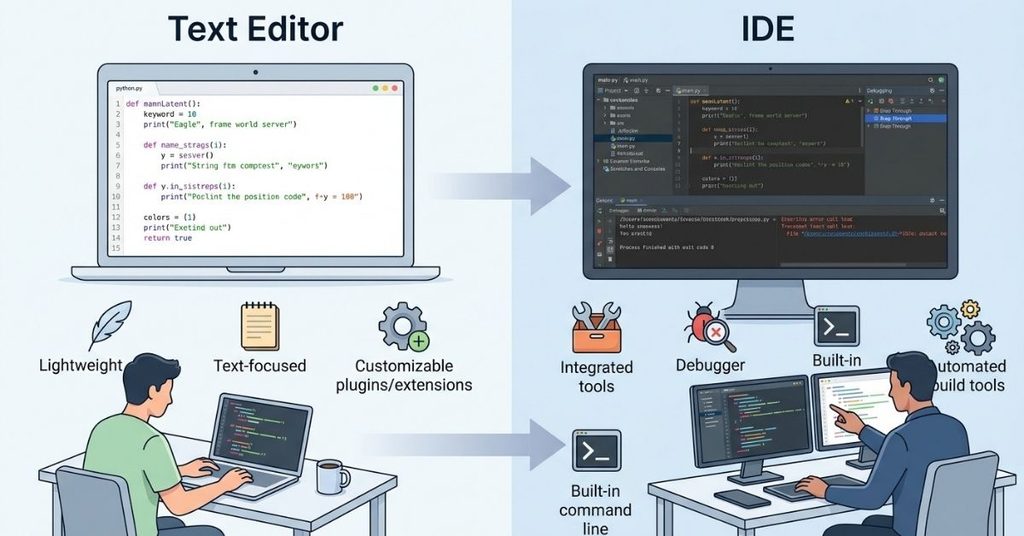
Beginners often start with a text editor for its simplicity, then move to an IDE once projects grow larger and debugging tools become genuinely useful.
Object-Oriented Programming Basics
Object-oriented programming (OOP) organizes code around “objects,” which bundle data and behavior together. Instead of writing one long script, you build reusable templates called classes.
A Car class might store data like color and speed, plus behaviors like accelerate() and brake(). Once you define that class, you can create as many car objects as you need, each with its own values, without rewriting the underlying logic. Python, Java, and JavaScript all support OOP, and understanding it unlocks cleaner, more reusable code as your projects grow.
Why Learn to Code? Real Benefits Beyond Software Jobs
Coding skills solve everyday problems that have nothing to do with becoming a professional developer.
Picture an office administrator who spends four hours every week manually copying data between spreadsheets. A short Python script, using a data library like pandas, can read the source file, apply the same formatting rules every time, and export a clean result in seconds.
That single script replaces a weekly manual task with one click. This pattern repeats across marketing, finance, and operations roles, wherever repetitive spreadsheet work eats up someone’s week.
Coding also builds a transferable way of thinking: breaking a large, messy problem into small, testable steps. That skill helps in project planning, research, and decision-making, far outside any code editor.
Coding for Beginners: How to Get Started Today
You don’t need a computer science degree to start. Here’s a realistic path:
- Pick one beginner-friendly language. Python remains the most common starting point because of its readable syntax.
- Learn core concepts before frameworks. Variables, loops, conditionals, and functions matter more early on than any specific library.
- Build small, finished projects. A calculator, a to-do list, or a simple quiz app teaches more than passively watching tutorials.
- Read error messages instead of fearing them. Every programmer, at every level, spends real time debugging. Error messages usually tell you exactly what broke.
- Practice consistently, even in short sessions. Twenty focused minutes daily beats one long session per week.
New coders often lose time setting up their development environment before writing any real code. If your first script won’t run, check your installed language version and your file path before assuming your code itself is wrong.
Frequently Asked Questions
Is coding hard to learn?
Coding demands patience more than raw talent. Early syntax errors feel frustrating, but they get easier to spot and fix as you build experience with a language.
How long does it take to learn coding?
Most beginners can write simple working programs within a few weeks of consistent practice. Comfortable, job-ready skills in one language typically take several months to a year, depending on how much time you invest.
What is the best first programming language to learn?
Python fits most beginners well because of its readable syntax and wide use in automation, data work, and web back-ends. If you want to build visual, interactive websites first, JavaScript is a strong starting point too.
Do I need a powerful computer to start coding?
No. Most beginner projects run comfortably on an average laptop. A code editor and a language installation are the only real requirements to get started.
What’s the difference between a programmer and a software engineer?
A programmer writes code that solves specific problems. A software engineer applies broader engineering principles, including system design, scalability, and long-term maintenance, across an entire application.
Conclusion
Coding turns plain instructions into actions a computer can execute, layer by layer, down to raw binary and back up to a result on your screen.
By now, you should have a clear understanding of what coding is, how source code becomes machine code, how compilers and interpreters differ, and why both syntax and semantics matter.
You’ve also seen how front-end and back-end code work together, how algorithms shape a program before a single line gets written, and why choosing the right first programming language can make learning easier.
You don’t need to memorize everything at once. Pick one language, build a small project, and let each error message teach you something concrete.
That’s how every working developer starts, and understanding what coding means gives you the foundation to keep learning with confidence.

I am Qasim Ali, a technology enthusiast passionate about exploring the latest innovations shaping our digital world. With 5+ years of experience in technology and digital trends, I share practical insights on AI, software, hardware, cybersecurity, programming, and emerging technologies. Through Techvens, my goal is to simplify complex technology and help readers stay informed, confident, and ahead in the fast-moving tech world.